Matrices
Editing
There are a few ways to insert a matrix: from the menu Insert > Matrix..., keyboard shortcut CTRL+M, from the Matrices palette (Matrix 3x3), or by inserting the function mat(. You will get the 3x3 template, or a dialog box to insert the number of rows and columns. Let us assign to a variable name A a matrix with dimensions 3(rows)x3(columns). For instance, press A: and then CTRL+M. The matrix template with 3x3 empty placeholders will appear.
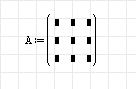
If you change your mind about the dimensions, you can always change the matrix dimensions. Just click inside the matrix on the right lower corner. The black square with a vertical and horizontal line will appear. With the left mouse button (mouse pointer will change appearance) drag and correct the dimensions. You can do that even if the placeholders are not empty.
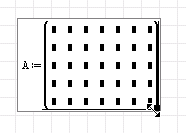
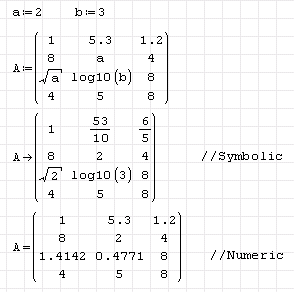
Let us now fill in the placeholders like in the following picture. If we point at the matrix with the mouse, a tooltip will appear. This is the symbolic presentation of the matrix. As you can see, real numbers are presented as fractions and there are also two undefined variables (a and b, without numerical values).
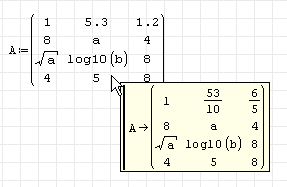
Usage: Symbolic vs. Numeric
If we assign values to variables a and b before the matrix definition, the result would be:
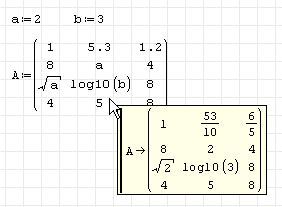
We can present the result of matrix A symbolically (operator →) or numerically (operator = ). Note the difference:
Extracting Elements
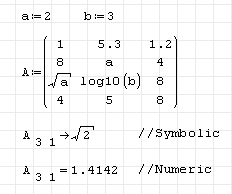
Also, an individual matrix element could be presented with the function el. Press el(A, or A[. You will see:

Assigning Values to Elements
Now, you can insert a single integer (vector) or two integers (matrix) to assign vector or matrix elements. Here (matrix) press 3,1→ or 3,1= . The value of A in the third row and first column will appear (the minimal row and column index is 1).
Vectors
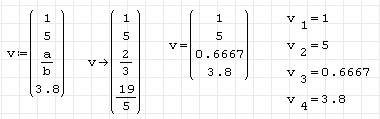
SMath will consider a column matrix as a vector. Vector elements need only one index. Here is the example (row matrices still need two indices, with the 1 as the first one).
Advanced
It should be noted that elements of a matrix could be of different data types (numeric, text, units). Here are a few simple examples demonstrating this feature.
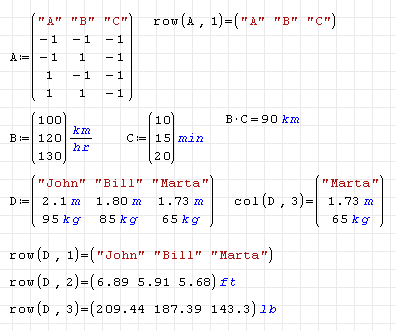
Note the use of the functions row and col to extract a single row or single column.
SMath also supports nested matrices, i.e. a matrix element could also be a matrix. See the next example.
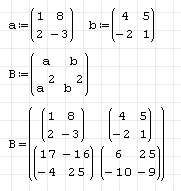
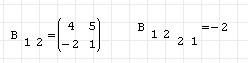
The individual elements are presented in the same way as before.
Matrices in SMath are dynamic arrays and they can change their dimensions. For instance, the matrix function gives a matrix filled with zeros. See how you can do the same by assigning the zero value to the element z3 4.
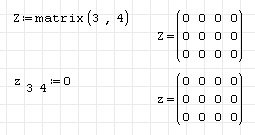
Try to put now, say, z5 5:=2
Besides the matrix/vector variables, there are also matrix/vector functions.
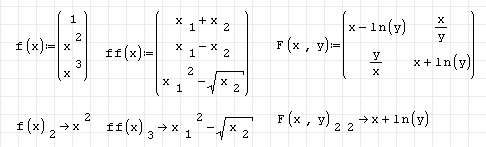
Function f has a single argument and it returns a three element vector. The argument can be scalar, vector or matrix. Try it. Function ff expects a two element vector, and function F expects two arguments and returns a 2x2 matrix. Play with them.
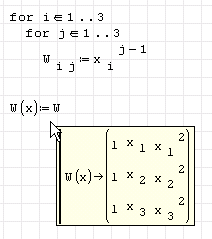
When dealing with matrices, although there are many matrix/vector operators and functions, sooner or later loops will be involved. Most often single, double, or nested for loops are used. See this simple example:
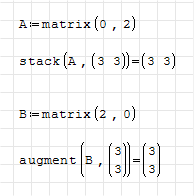
You can initialize an empty matrix with fixed dimensions using matrix(rows,cols) and setting one of the two arguments to 0.
This page is based on a legacy wiki article by Davide Carpi.