Extensions Manager
Extensions Manager is a built-in tool to access approved registered extensions directly from SMath Studio. It provides access to several kinds of extensions like Handbooks, Examples, Plugins, Applications, Snippets, Translations and others. It is available in SMath Studio using main menu: Tools > Plugins... or Help > Examples...
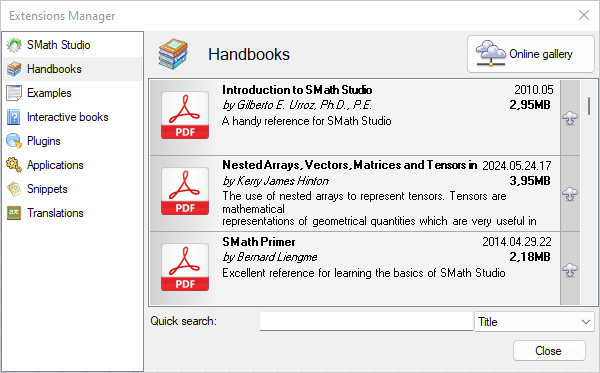
Extensions Manager lets you search, download, and open or install extensions through a simple, intuitive interface. It is a great tool to deliver extensions to end users easily.
Extensions Register
Extensions Manager is developed to work in two modes:
- Local storage - lets you browse resources available locally on the workstation;
- Online gallery - this mode requires Internet connection to access an extensions register. This register is always available by the following url: https://smath.com/en-US/licensing/api/Extensions.
Please also note:
- If your copy of SMath Studio is connected to the Local Licensing Server it is required that Local Licensing Server has Internet connection to work with Online gallery mode.
- SMath Studio Enterprise must be activated to work with Extensions Manager in Online gallery mode.
Sharing of Extensions
Everyone from community is able to share extensions with others by registering of extensions using a simple web-based tool: https://smath.com/en-US/files/Registration. It lets you register extensions of any supported kind.
To get access to the sharing form one needs to create an account. As a result, sharing form will open where it will be possible to select type of the extension and to upload it to https://smath.com/.
In order to provide the best quality of the extensions, every newly registered extension must be approved by the SMath support team before appearing within Extensions Manager. It usually takes up to 2 working days to have a registered extension available within the extension register. Updates to an already approved extension will replace the previous version automatically, immediately after sharing.
Once an extension is approved, SMath Studio will show it within Extensions Manager. It's that simple. Feel free to upload useful extensions to share them with the community!