Local Licensing Server
Introduction
By default SMath licensing system supposes SMath Studio is getting your license details from SMath Root Licensing Server at smath.com. Usually it is convenient for the individuals and some small companies. But it causes a number of artificial constraints for the commercial customers:
- Permanent Internet connection to the Root Licensing Server is needed from all machines where SMath Studio is used.
- In order to manage your company users you need to register them on smath.com.
- You manage your license bindings via your software vendor.
In order to address all these issues and provide a platform for future organizations related improvements Local Licensing Server has been created.
Interaction Scheme
All interactions between client and server products happen over TCP/IP using HTTPS (HTTP is also possible within a local network).
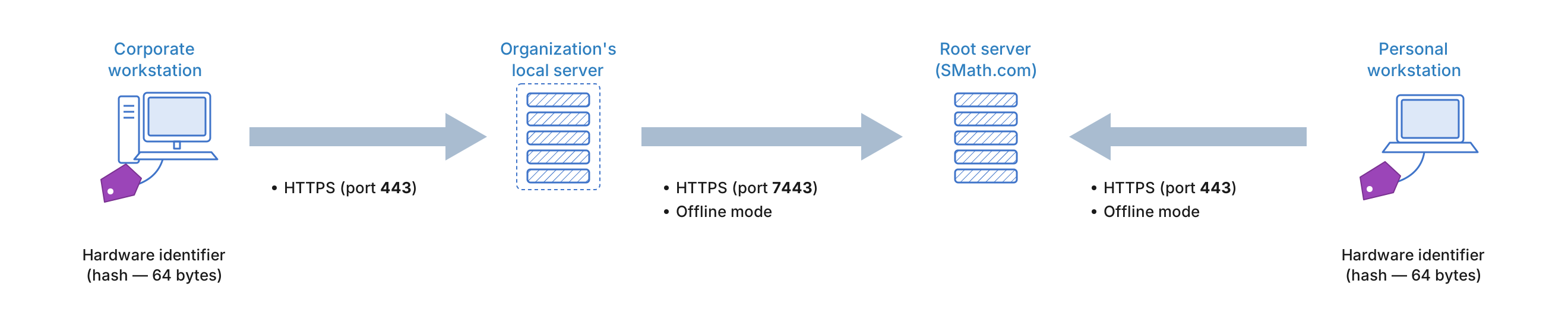
Note that starting with Local Licensing Server version 5.1, its Online communications with the Root Licensing Server happen over port 443.
Features
- User friendly interface available in your favorite browser.
- It still needs an access to Root Licensing Server, but it is enough if it happens once a day. It means short-time Internet related issues does not affect end users at all.
- Full Offline Mode is also supported.
- You manage your users locally. Only single account for your company is needed on smath.com in order your server would be able to get license info from the Root.
- It is your choice to manage your users name by name or to provide anonymous access for them in order to stop handling all those forgotten passwords at all.
- You get a chance to monitor who is using what licenses right now. If you purchased Floating licenses it may show you who locked the license for example.
- Compact installation package — just about 240 MB to download.
- Driven by Docker technology and may be easily installed on any Operating System just in a few minutes.
- May be moved to another IP address, another port, another machine in your network any moment without involving your software vendor at all.
- Adding new license(s), changing or prolonging it does not require Server recreation/reinstallation or SMath Studio reinstallation.
- Both Fixed and Floating licenses supported. If you are not satisfied by Local Licensing Server for any reason, all your licenses always may be moved to the Root Licensing Server or vice versa by your software vendor.
- SMath Studio Enterprise may use both Root and Local Licensing Server if required.
- You are getting it for free when buying at least 5 any SMath licenses.
- More nice features are coming soon.
System Requirements
SMath Local Licensing Server can be installed on any OS capable of running the Docker platform. That said, we recommend using one of the configurations we've tested:
- Astra Linux SE 1.7.5: https://astralinux.ru/os/astra-linux-se/
- RED OS 8: https://redos.red-soft.ru/
- Ubuntu Server 22.04: https://releases.ubuntu.com/releases/22.04/?C=S;O=D
- Ubuntu Desktop 24.04 LTS: https://ubuntu.com/download/desktop
- Fedora Workstation 40: https://fedoraproject.org/workstation/download
- Microsoft Windows 11: https://www.microsoft.com/software-download/windows11 (in this environment, Docker Desktop was found to have limitations auto-starting the platform after an OS reboot — it only works while a user is logged in)
The following application combinations have been successfully tested:
- Docker: 24.0.2 / Docker Compose 1.29.2 (Astra Linux)
- Docker: 27.4.1 / Docker Compose 2.32.1 (RED OS)
- Docker: 24.0.6 / Docker Compose 2.21.0 (Ubuntu Desktop)
- Docker: 26.1.4 / Docker Compose 2.27.1 (Ubuntu Server)
- Docker: 26.1.1 / Docker Compose 2.27.0 (Fedora Workstation)
- Docker: 20.10.17 / Docker Compose 2.6.1 (Microsoft Windows 11)
Local Licensing Server has also been successfully installed inside an LXC container (based on Ubuntu Desktop 24.04) under Proxmox.
Hardware Requirements
Minimal SMath Local Licensing Server System requirements are: 2GB HDD, 1GB RAM, and a 2-core, 64-bit CPU at 2GHz. While the SMath Local Licensing Server is running, our application does not accumulate any significant permanent data volume and therefore does not save it to disk. It allows to avoid potential low disk space reported over time.
If the SMath Studio Cloud service is included in your Local Licensing Server delivery, the server machine's requirements depend on the number of concurrent connections and the complexity of the tasks being performed. We recommend adding 1 CPU core, 0.5GB RAM, and 0.5GB disk space for every 2-5 concurrent SMath Studio Cloud users. Keep in mind that the server's disk usage grows with the volume of documents being processed while the application is running, and available disk space should be increased by the administrator over time to match the load on SMath Studio Cloud.
Software updates provided as part of technical or warranty support may require increased performance resources in terms of RAM and CPU.
Software Requirements
Local Licensing Server in Docker format allows its deployment on almost any modern server: both Linux and Windows based. The Docker platform must be available on the server machine where the licensing server will be installed.
- If you already have a Docker host in your network, the installation will take just a few minutes, because you are provided with a self-sufficient Docker Compose configuration (you just may need to change the external ports in the configuration if the standard 80 and 443 ports are already occupied).
- If you still do not use any Docker host, you may install Linux on any available hypervisor or dedicated physical machine (see System Requirements above for the Linux distributions we've tested, but you may also use an alternative distribution you prefer) in order to install Docker there. We provide configuration file, set of images and commands to be executed in terminal window in order to get SMath Local Licensing Server up and running.
If there are traffic filtering tools (firewalls) in the network environment, it is necessary to ensure that traffic passes through the specified ports:
- To the server: ports 80 and 443 (if they are not changed when deploying the server).
- From the server: requests to the address https://smath.com:7443 (not required in Offline Mode).
You also need to allocate static IPv4 address for Docker host in organization's network (it has to be kept for the whole server life cycle), since SMath Studio Enterprise will be getting licenses namely using this IP address. You are also free to register some human readable DNS name for the server and use it instead of IP both for web access to the server management console and during configuration of your SMath Studio.
Installation
Installing the Licensing Server consists of a few stages:
- Installing the Docker platform on the server's OS.
- Deploying SMath Local Licensing Server on the Docker platform. Containers used:
| Name | Description | Default port |
|---|---|---|
| smath-app-* | The main application implementing the system's business logic | 80, 443 |
| smath-db | The database management system | - |
| smath-init | A tool for the environment's initial setup | - |
- Configuring SMath Local Licensing Server.
Networking Requirements and Notes
Using Web Proxy in front of the Local Licensing Server is acceptable if the following requirements respected:
- Local Licensing Server should be always available in the root of the URL to the server (i.e. https://example.local/, not https://example.local/some/path).
- HTTP to HTTPS redirection is supported if Local Licensing Server is listening for connections through HTTPS.
- All pages of the Local Licensing Server web-site must be available on the same IP and port as the main web page does.
- Local Licensing Server should be available from the client machines by IP. SNI (Server Name Indication) is not supported.
- If DNS zone is used: only the first IP from all A records associated with DNS name will be used by Local Licensing Server clients to obtain licensing info.
Important notes:
- Local Licensing Server clients can obtain licenses either using HTTP or HTTPS URI schemes (the same port can be used).
- A valid SSL certificate is not required when using HTTPS URI scheme for the Local Licensing Server as the licenses packages are signed themselves.
- SMath doesn't collect customers' local network configuration (including IP and port) - we are using SHA256 hash of this data only.
Support
Detailed setup instruction will be given to your License Holder by your software vendor after purchase. Our technical specialists are always ready to assist you with the server as a standard part of SMath infrastructure. If you need to self-diagnose an issue first, see Accessing Local Licensing Server Logs.
Limitations
At the moment only commercial customers may purchase Local Licensing Server.