Trace Function
trace(var#1,var#2,...,var#n) traces evaluations through the Output window.
It returns a string containing the value of the arguments, with the output order and surrounding text specified by the first argument. Specifying the first text argument is optional.
trace() is a function introduced to help users debug scripts.
Syntax
If var#1 is not text, trace() returns comma-separated values.
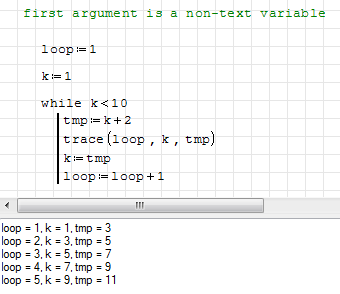
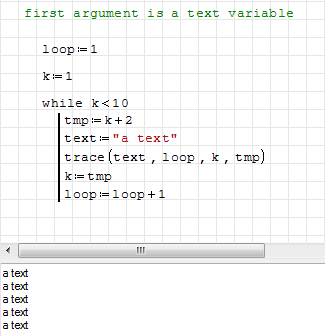
If var#1 is text, trace() returns the string (no other values).
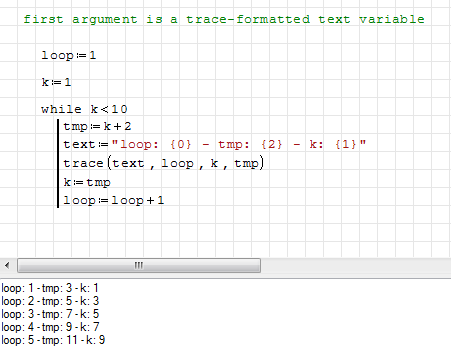
If var#1 is trace-formatted text, trace() returns a string according to the var#1 pattern.
To show variable values with custom text/order, insert the trace() variable position index into curly brackets. The variable position index is 0 for var#2, 1 for var#3, 2 for var#4, etc.
Note: curly brackets can be typed with Shift+[ for "{" and Shift+] for "}".
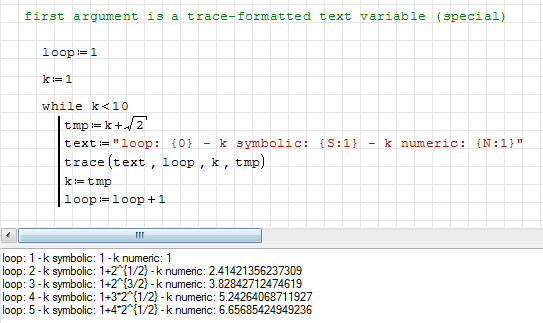
trace() output can force evaluation by placing one of the following before the position index:
S:for symbolic evaluationN:for numeric evaluation
Usage
trace() can be used:
- directly, like a common function requiring numeric (=) or symbolic (→) evaluation
- directly, inside while loops
- directly, inside for loops (at least one operation must be performed inside the loop)
- directly, inside line() (at least one operation must be performed inside the line())
- inside user-defined functions
See also
This page is based on a legacy wiki article by Davide Carpi.