Installing the Local Licensing Server
How to deploy the Local Licensing Server on a Docker host. Check the system requirements first; after installation, continue with the initial setup.
This page describes Local Licensing Server 5.1. For version 4.2 and earlier the details may differ — see the delivery instruction for version 4.2 (PDF).
The delivery package
An installation package is prepared for your organization after the agreement is signed. It is unique to your organization and intended for a single legal entity only — do not publish it. Your software vendor tells you where to download it; the download may require authentication with the data from your electronic license document.
Extract the downloaded archive to a local disk — not to a network share or a mapped drive — and perform all further steps in that folder. It contains two files:
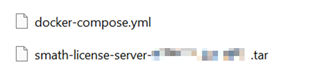
docker-compose.yml— the Docker configuration, a text file;- a
.tararchive with the Docker images.
Both can be used unchanged if the default configuration suits you.
Loading the images
Make sure Docker and Docker Compose are installed and working. Open a terminal in the folder with the extracted files and import the images into Docker:

Choosing the ports
docker-compose.yml defines two external ports you may change if they are already taken on the host:
- HTTP port 80 — the server's web pages;
- HTTPS port 443 — protected connections from SMath software.
If you change them, open the new ports in the firewall instead (Network).
Starting the server
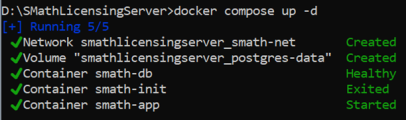
When the command succeeds, Docker starts the server's containers:
| Container | What it is |
|---|---|
smath-app |
The main application with the system's business logic. It writes its logs as described in Accessing Local Licensing Server Logs. |
smath-db |
The database management system. |
smath-init |
A tool for the initial setup of the environment; it exits once it is done. |
The server is now running. Open its web pages to complete the initial setup.