Connecting SMath Studio Enterprise to a Licensing Server
SMath Studio Enterprise obtains its license from a licensing server: the Local Licensing Server in your organization, or the Root Licensing Server.
In the program
Click Activate in the upper right corner of the main window and fill in the dialog:
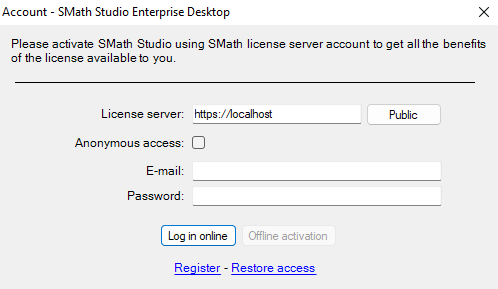
- License server — the address of the licensing server. State the scheme explicitly:
http://orhttps://. Use the address configured as the server's network address (Loading Licenses). - Anonymous access — no user account is needed; licenses are obtained anonymously. The administrator still sees the computer's IP address. A fixed license is available to anonymous users only if the license is configured for it (License Reservation).
- E-mail and Password — for a server that authenticates users. Without an account, create one with the Register link, if the server allows self-registration.
Then click Log in online.
From the command line
<SERVER>— the URL of the licensing server;<USERNAME>— the e-mail or user name registered on the server. An empty string uses anonymous access.
If a password is needed, the program asks for it.
If it does not work
See License Obtaining Challenges — mismatched server address, clock differences and connection problems are the usual causes.